Your clipboard history.
Private, searchable, yours.
A Windows clipboard manager with AES-256 encryption, instant search, and no cloud. Pay once, use forever.

Everything you copy, instantly within reach
ClipSnip quietly captures your clipboard, encrypts it on your machine, and makes every snip searchable in milliseconds.

Find anything you've copied, instantly
FTS5 full-text search runs across your entire history the moment you type — and one-click filters jump you straight to Text, Images, or Emojis, each with a live count.
- Search by keyword, app, date, or content type
- Stays instant even with 10,000+ clips
- Navigate with the keyboard, paste with Enter
Your data stays on your machine
Every clip is encrypted with AES-256 (SQLCipher) the instant it's captured — the same encryption 1Password and Signal use. No cloud sync. No telemetry. No account. And secrets like sk_live_••••4ad9 are auto-masked before they're ever shown.
- AES-256 encryption at rest, key in Windows Credential Manager
- Auto-masks cards, SSNs, API keys & private keys
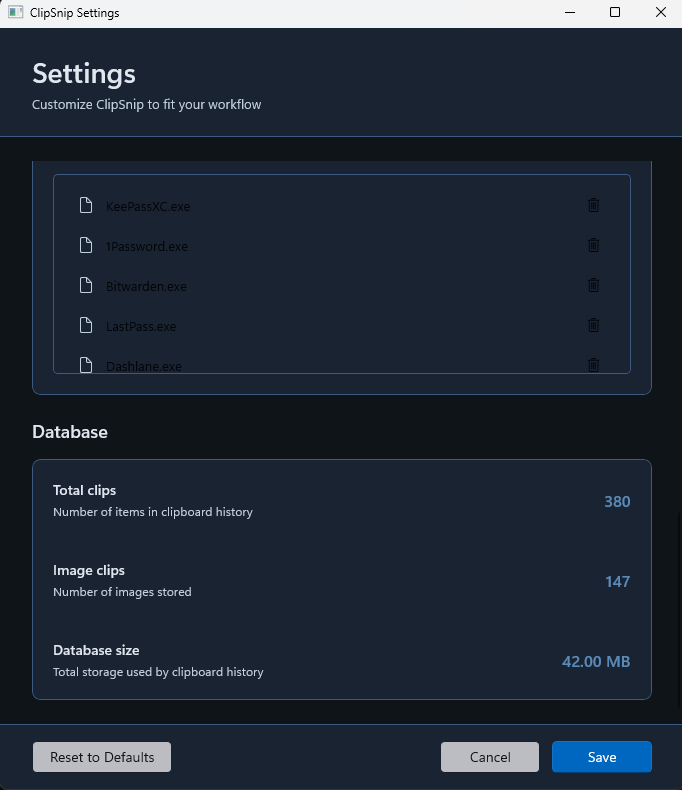
- Exclude password managers from monitoring entirely

Every format, organized for you
Text, code, links, images and emojis are all captured automatically — images even get thumbnails — and every clip remembers the app it came from, so your history stays organized without any effort.
- Image thumbnails with a built-in full-size viewer
- Pin the clips you reach for most to the top
- Smart de-duplication keeps history clean

Built for the keyboard — full size or compact
Press Ctrl+Shift+V to summon ClipSnip over any window, search, and paste without breaking flow.
- Global hotkey works over any application (fully customizable)
- Shortcuts for navigate, paste, pin, delete & more
- 13 themes and adjustable window transparency
Set it up exactly how you like
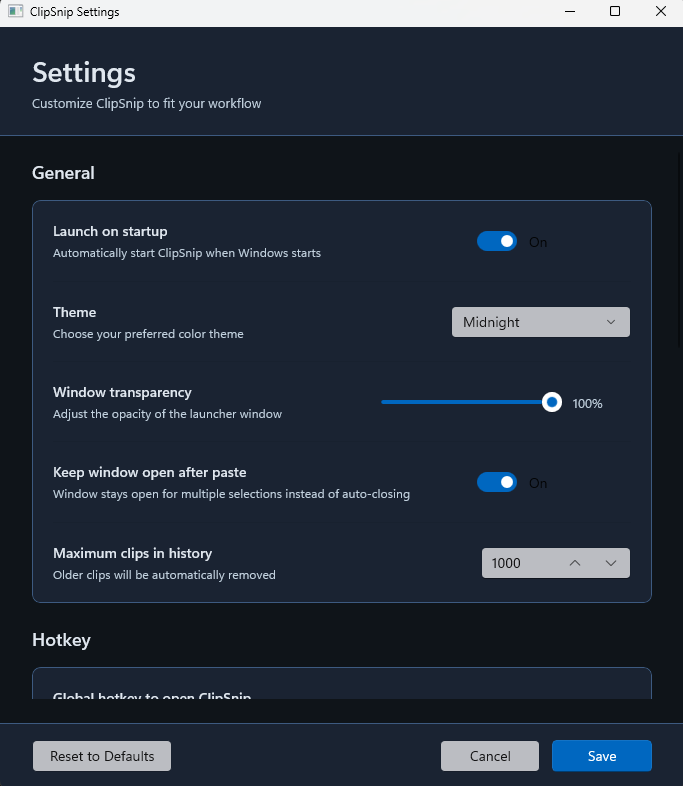
ClipSnip bends to your machine and your habits. Pick from 13 Fluent themes, dial window transparency to match your desktop, and decide how it behaves — right down to how much history it keeps.
- 13 themes & adjustable window transparency
- Launch on startup, keep-open-after-paste, history cap
- Remap the global hotkey to whatever you want
13 built-in themes
Light, dark, system, and ten accent themes — all built on Windows Fluent design with Mica and acrylic.
Pin what matters
Keep frequent snippets, templates and commands pinned to the top — visible through any filter or search.
Free auto-updates
Delta updates download silently in the background and apply on your schedule — every release, free forever.
Excludes password managers
Skip monitoring for 1Password, Bitwarden, KeePass and any apps you choose, so secrets never get captured.
Lives in your tray
Runs quietly from the system tray with near-zero idle CPU — always ready, never in the way.
Zero dependencies
~50–100 MB of RAM, everything bundled in one installer, and no admin rights required to install.
Three steps. That's the whole thing.
No setup, no accounts. Install it and ClipSnip starts working the moment you copy.
Copy anything
Text, images, code, links — ClipSnip captures everything you copy and encrypts it locally, automatically.
Search instantly
Press Ctrl+Shift+V and type. Full-text search filters your entire history in milliseconds.
Paste & go
Hit Enter on the snip you need and it pastes straight into whatever you were doing.
Local-first, by design
Cloud clipboard tools trade your privacy for convenience. ClipSnip doesn't. Here's how it compares.
| Capability | ClipSnip | Cloud clipboard services |
|---|---|---|
| Where your history lives | On your machine, encrypted | On someone else's servers |
| Encryption | AES-256 at rest | Varies / in transit only |
| Telemetry & tracking | None | Usually collected |
| Sensitive-data masking | Automatic | Rare |
| Use across your computers | Up to 3, one license | Usually multi-device |
| Pricing model | $29 once · updates free | Monthly subscription |
| Cost over 5 years | $29 total | ~$480 ($8/mo) |
| If you stop paying | Keep it forever | Lose access |
| Works offline | Always | Needs a connection |
One price. Yours forever.
No tiers, no subscription, no upsell. Buy ClipSnip once and every future update is free.
Everything in ClipSnip, on up to 3 computers, forever — including every future core update.
Use on 3 computers — work, home & travel- Install on up to 3 computers
- Deactivate & transfer anytime
- Lifetime license, yours forever
- All future updates free
- Unlimited clipboard history
- Instant full-text search
- AES-256 encryption
- Sensitive-data masking
- Image & thumbnail support
- Windows 10 & 11
Secure purchase through Microsoft Store — covered by Microsoft's refund policy
What you'd pay over 5 years
A typical $8/month clipboard service costs $480 over five years. ClipSnip is $29, once — that's $451 saved.
Questions, answered
We distribute ClipSnip exclusively through the Microsoft Store to ensure security and trust. Microsoft's code signing and app validation process guarantees that what you download is authentic and hasn't been tampered with. The Store also provides automatic updates and a trusted payment system. Direct downloads may be offered in the future, but for launch, we're prioritizing the safety and peace of mind that comes with official Store distribution.
There's no time-limited trial, but every purchase is backed by a 30-day money-back guarantee. Try ClipSnip risk-free — if it's not for you, email us within 30 days for a full refund, no questions asked.
ClipSnip is Windows-only for now (Windows 10 and 11). We're considering Mac support based on demand — let us know if you'd want it.
Yes — your license works on up to 3 computers at once. Perfect for a work laptop, home desktop, and a backup or travel PC. When you upgrade machines, just deactivate the old one and activate the new one with the same license key.
Simply sign in with the same Microsoft account on your new computer and download ClipSnip from your Microsoft Store library. Your purchase automatically transfers. If you need to use it on more than 3 devices, you can manage your device list through the Microsoft Store or contact us at support@getclipsnip.com.
Yes. Pay once, use forever. All core features you purchase today are yours permanently, including bug fixes, security updates, and performance improvements. We may offer optional premium add-ons in the future (like AI features or cloud sync), but everything you buy today will always work — no subscriptions, no renewals, no surprises.
Each license is for one person across their own devices (up to 3). If more people want ClipSnip, everyone needs their own license. For household or team bundles, email support@getclipsnip.com about volume pricing.
Locally on your computer, in an AES-256 encrypted SQLite database (SQLCipher). Nothing is ever sent to the cloud, and there are no accounts or servers involved.
Not yet — ClipSnip is local-first by design, so your history lives on each computer rather than syncing through the cloud. Your one license still covers up to 3 computers. If cloud sync ever arrives, it will always be optional and end-to-end encrypted.
Updates download quietly in the background and prompt you to restart when they're ready. Every update is free, forever — that's included in your one-time purchase.
Your ClipSnip license is automatically managed through your Microsoft account. Once you purchase ClipSnip from the Microsoft Store, you can install it on up to 3 Windows devices signed in with the same Microsoft account. No license keys to manage — it just works. Your purchase history is always available in your Microsoft Store library.
All purchases through the Microsoft Store are covered by Microsoft's refund policy. You can request a refund directly from Microsoft within their standard refund window. If you have any issues, you can also contact us at support@getclipsnip.com and we'll help facilitate the process.
Absolutely. Each person needs their own license. For 5+ seats, email support@getclipsnip.com for volume pricing.
Possibly. We may offer optional add-ons like AI-powered features or cloud sync in the future. But here's our promise: everything you buy today works forever. We'll never remove features or put existing functionality behind a paywall. Your $29 purchase is complete — any future add-ons are 100% optional.
Stop losing what you copied.
Private, searchable clipboard history for Windows — one $29 purchase, yours forever.